How-to · Developer
How to mock API responses in Chrome
The short answer
Add a rule with a URL pattern, method and status code, then paste the JSON you want returned — the extension intercepts matching requests and returns your response locally, with no proxy or server.
- 1
Open the extension and add a rule under Mocks.
- 2
Enter the URL pattern and pick the HTTP method(s).
- 3
Choose the status code and paste the JSON response body.
- 4
Save — matching requests now return your mock, locally.
You don't need a proxy or a fake backend to test how your app handles an API response. In Chrome you can intercept a request and return your own JSON — locally, with a rule you set up once.
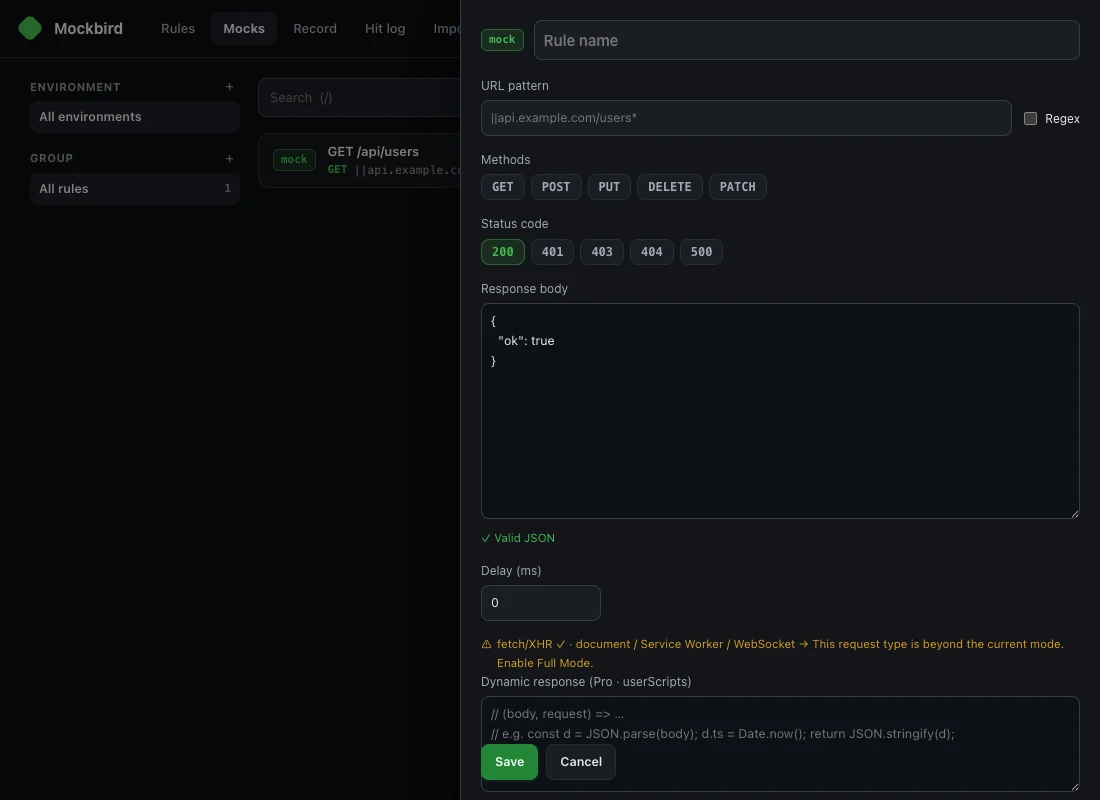
Add a mock rule
Open the extension and add a rule under Mocks. Give it a name so you can find it later.
Match the request
Enter the URL pattern (e.g. ||api.example.com/users*), pick the HTTP method(s), and — if you need it — turn on Regex.
Set the response
Choose the status code (200, 401, 404…) and paste the Response body JSON. You can add a delay to simulate a slow network, and Pro adds dynamic responses via userScripts.
Save and test
Save. Matching requests now return your mock instead of hitting the network — great for building against an API that isn't ready, or reproducing an error state. Everything runs locally.