How-to · Developer
camelCase vs snake_case vs kebab-case: where each belongs, and how to convert
The short answer
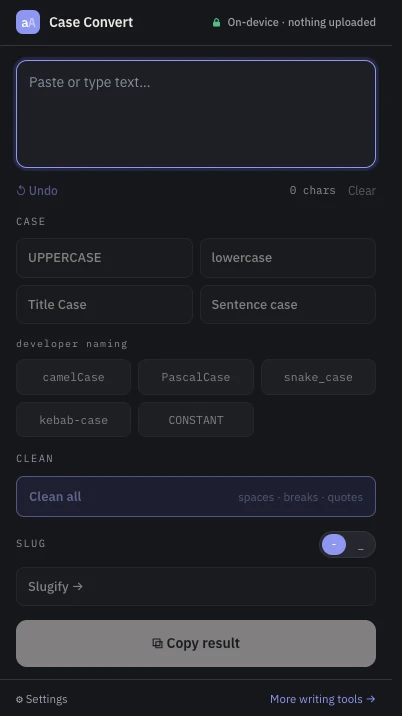
camelCase is the JavaScript/JSON convention, snake_case belongs to Python and SQL, kebab-case to CSS classes, file names and URLs. To convert between them, paste the identifier into Case Converter and click the target style — it re-tokenizes on case and acronym boundaries, all locally.
- 1
Click the Case Converter icon to open the popup.
- 2
Paste one identifier or phrase — spaces, case boundaries and acronyms all mark word splits.
- 3
Click the target style: camelCase, PascalCase, snake_case, kebab-case or CONSTANT.
- 4
Click Copy result, or Undo to try a different style.
- 5
Repeat per identifier — the whole input becomes a single name, so convert one at a time.
Identifiers cannot contain spaces, so every ecosystem invented its own way to mark word boundaries — and the moment you move data between ecosystems, you are renaming things. A JSON payload written in camelCase meets a Python service that wants snake_case; a component name needs to become a file name. Here is where each convention actually belongs, and how to convert without hand-editing.
Where each convention belongs
camelCase is the JavaScript and Java default for variables and functions, and the dominant style for JSON keys. snake_case is what Python, Ruby and Rust use for variables and functions, and the safest style for SQL column names. kebab-case lives where identifiers meet the web: CSS classes, HTML attributes, file names and URL slugs — it cannot be used in most programming languages, because the hyphen parses as a minus sign. Two siblings complete the set: PascalCase for classes, types and React components, and CONSTANT_CASE for constants and environment variables. Whatever the global norms say, consistency inside one codebase beats them all.
Convert by re-tokenizing, not find-and-replace
Renaming by hand means splitting words in your head, and a plain find-and-replace cannot do it at all — there is nothing to search for at an invisible word boundary. Case Converter does it mechanically: paste the identifier — or a plain phrase with spaces — and click the target style. The tokenizer splits on any non-alphanumeric run and on case boundaries, and it understands acronyms: XMLHttpRequest becomes xml_http_request, not x_m_l_http_request. It is Unicode-aware too, so accented words survive the split.
One identifier at a time
An honest boundary: the developer naming buttons re-tokenize the entire input into a single identifier. If you paste a multi-line list of names, they will be joined into one long identifier — so convert one identifier or phrase at a time, using the Undo button to step back between attempts. Characters without case, such as Chinese or Japanese, pass through unchanged.
Local, free, no page access
The extension is a pure popup: its only permission is local storage, it never reads your tabs, and nothing you paste is uploaded. Internal API names and unreleased schema fields stay on your machine. The same popup also carries the editorial cases, text cleanup and a URL slug generator when you need them.