How-to · Writing
How to convert text to uppercase or lowercase without retyping
The short answer
Paste the text into the Case Converter popup and click UPPERCASE or lowercase. Only letter case changes — spacing, punctuation and line breaks stay exactly as they were — and everything runs locally, so nothing is uploaded.
- 1
Click the Case Converter icon to open the popup.
- 2
Paste the text you want to convert.
- 3
Click UPPERCASE or lowercase — only letter case changes, layout is preserved.
- 4
For ALL-CAPS text, use Sentence case instead, then restore capitals on proper nouns.
- 5
Click Copy result and paste it back into your document.
It happens constantly: a heading typed with caps lock on, an ALL-CAPS paragraph quoted from an email, a legal boilerplate block that needs to read like normal prose. Retyping is slow and introduces typos, and pasting your draft into a random "case converter" website means shipping it to someone else's server first. Here is how to switch case in one click, entirely inside your browser.
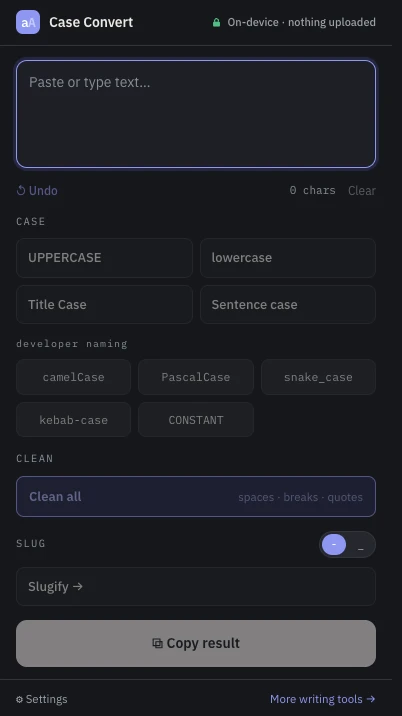
Paste the text into the popup
Click the Case Converter icon and paste your text. The extension is a pure popup with a single permission — local storage, for your preferences — so there is nothing to grant and it never reads the pages you visit. A character counter confirms everything arrived.
Click UPPERCASE or lowercase
One click converts the whole text — a word, a heading or several paragraphs at once. These are editorial conversions: only the letters change case, while spacing, punctuation, digits and line breaks are preserved exactly. A formatted paragraph comes back with its layout intact — you are changing case, not reformatting. That distinction matters more than it sounds: many converters normalize whitespace as a side effect, and a contract clause or a poem does not appreciate having its line breaks rearranged.
Fixing ALL-CAPS text: lowercase is only half the job
Lowercasing a SHOUTING paragraph leaves you with no capitals at all. Click Sentence case instead: it lowercases the text and then capitalizes the start of each sentence, including after question marks, exclamation points and new lines. One honest caveat — it cannot know that "paris" is a proper noun, so skim the result and restore capitals on names yourself.
Undo and try another style
The popup keeps an Undo button, so you can flip between UPPERCASE, lowercase, Sentence case and Title Case until the text reads right. The same popup also holds developer namings (camelCase, snake_case and friends), a cleanup pass for messy pasted text, and a slug generator — but for everyday writing, the four editorial buttons are the ones you will reach for.
Copy the result — nothing was uploaded
Everything runs on your device: no account, no server round-trip, no tracking. That matters when the text you are converting is an unpublished draft, a contract clause or an internal email. Click Copy result and paste it back into your document.