How-to · Writing
How to convert text to title case correctly (small words included)
The short answer
Paste your text into Case Converter and click Title Case. It applies the publishing convention: small words like "of", "and" and "the" stay lowercase unless they are the first or last word. Everything runs locally in the popup.
- 1
Click the Case Converter icon to open the popup.
- 2
Paste the headline or text you want to convert.
- 3
Click Title Case — small words stay lowercase unless first or last.
- 4
Check the options page any time to see the exact small-word list.
- 5
Copy the result back into your document.
Most "title case" tools get title case wrong. They capitalize every single word, which turns "a guide to the art of writing" into "A Guide To The Art Of Writing" — something no publication would print. Real title case, the kind style guides teach, keeps short function words lowercase: "A Guide to the Art of Writing". Here is how to get the correct version in one click, without pasting your draft into a website.
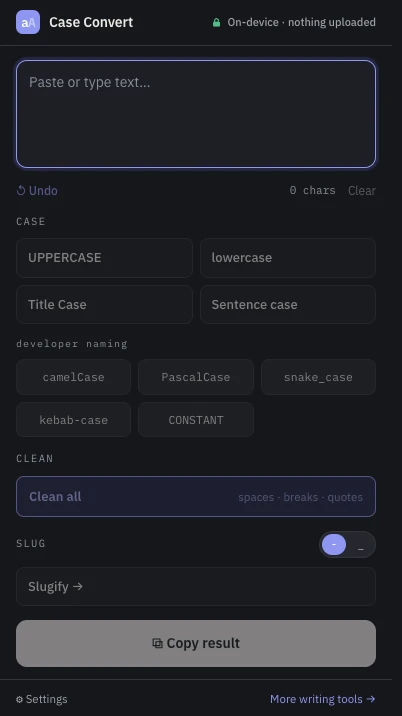
Paste your headline into the popup
Click the Case Converter icon and paste the text — a headline, a list of section titles, a whole outline. The extension is a pure popup with a single permission (local storage, for your preferences), so there is nothing to grant and no page access involved.
Click Title Case
One click converts the text using the publishing rule: every word is capitalized except recognized small words, which stay lowercase — unless they are the first or last word of the title, where convention says they are capitalized after all. So "the man in the arena" becomes "The Man in the Arena": the leading "The" is capitalized because it opens the title, while "in" and the second "the" stay down.
Know exactly which words stay lowercase
The small-word list covers articles, coordinating conjunctions and common short prepositions — a, an, and, as, at, but, by, for, from, if, in, into, nor, of, on, or, over, per, so, than, that, the, to, up, via, vs, with, yet. The full list is printed verbatim on the extension's options page, so the rule you are applying is never a black box.
Or choose Sentence case instead
Not every style calls for title case — many publications and most of the web now prefer sentence case. The popup has that too: it lowercases the text and capitalizes sentence starts, including after question marks, exclamation points and new lines. Developer namings (camelCase, PascalCase, snake_case, kebab-case, CONSTANT_CASE) sit in the same popup when you need them.
Copy the result — nothing was uploaded
Conversion happens entirely on your device. There is no account, no server round-trip and no tracking, which matters when the text you are casing is an unpublished draft. Copy the result and paste it back into your document. If the pasted text arrived with messy formatting, the same popup can strip extra spaces, blank lines, invisible characters and curly quotes first — and it reports exactly what it removed.