How-to · JSON
How to convert JSON to CSV locally, without uploading it
The short answer
Open JSONPeek's Settings page, set the converter to From JSON → To CSV, and paste your data. The CSV appears live, converted entirely on your machine, and anything CSV can't express — nested objects, nulls, missing columns — is called out explicitly next to the result.
- 1
Click the JSONPeek icon, then "Settings", and find the Convert panel.
- 2
Set the input format to JSON and the output format to CSV.
- 3
Paste your JSON into the input pane — the CSV appears live in the output pane.
- 4
Read the lossy-conversion notes, if any, so you know exactly what CSV couldn't express.
- 5
Press "Copy result" and paste the CSV wherever it's headed.
The top results for "JSON to CSV" are upload sites. That's a strange place to send an API export, because API exports are exactly the data you least want on a stranger's server: customer records, email addresses, order histories, tokens. Converting JSON to CSV is a local, mechanical job — here's how to do it in Chrome without the data ever leaving your machine.
Open the converter
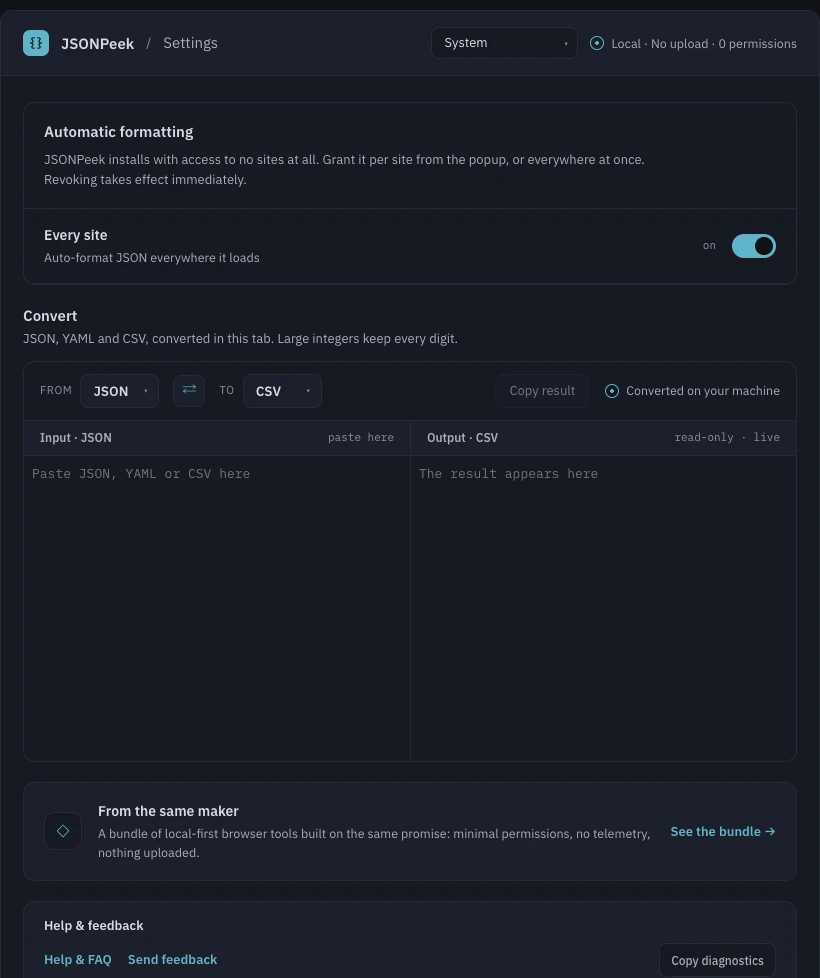
Click the JSONPeek icon, then Settings. Below the formatting options sits the Convert panel: an input pane, an output pane, and From/To selectors with a swap button between them. Set From to JSON and To to CSV.
Paste and copy
Paste the JSON into the input pane and the CSV appears in the read-only output pane as you type — there is no convert button and no round-trip, because there is no server. Press Copy result and paste it into your spreadsheet, script or import job. The extension makes no network requests, so this also works offline.
CSV can't hold everything — you'll be told what changed
A flat table can't express everything JSON can, and converters that pretend otherwise are lying by omission. JSONPeek lists each accommodation it made in a warning bar above the result: nested objects and arrays packed into single cells as JSON, null values written as empty cells (which CSV can't distinguish from empty strings), rows that lacked a column left blank, a lone object wrapped into a one-row table. They're notes, not errors — the result is ready, and you know exactly what it is.
Long IDs survive the trip
Converters built on JSON.parse corrupt 64-bit identifiers: 12345678901234567890 quietly becomes …568000, and the damage travels into your spreadsheet. JSONPeek parses with its own precision-preserving parser, so large integers keep every digit through the conversion.
It goes the other way, too
The same panel converts CSV back to JSON — with sensible typing of numbers, booleans and nulls, and its own honest notes when a spreadsheet export has ragged rows or duplicate headers — and it handles YAML in both directions. The swap button flips the two formats when you want to round-trip a result. And if what you actually need is indented JSON rather than a table, the converter pretty prints too.