How-to · Developer
How to decode a JWT and check its expiry in Chrome DevTools
The short answer
Open a DevTools panel that captures the token from a real request and decodes the header, payload and claims locally — with iat and exp rendered as readable dates and expired tokens flagged. Decoding is not verification: the signature is not checked, and the panel says so. Nothing leaves your browser.
- 1
Open DevTools on the tab that calls your API and switch to the AuthRoam panel.
- 2
Use the page so it makes a request, then select the captured token from the list.
- 3
Read the decoded header (algorithm, type) and payload claims as plain JSON.
- 4
Check the claims table for iat and exp as readable dates, with expired tokens flagged.
- 5
Remember what decoding can’t tell you: the signature is not verified — trust decisions belong on your server.
The usual way to read a JWT is to copy it out of a request and paste it into an online decoder. That works, but it means pasting a live credential into a website you don’t control. In Chrome you can do the whole job locally: capture the token from a real request in DevTools, decode the header and payload, and read the expiry as an actual date — without the token ever leaving your browser.
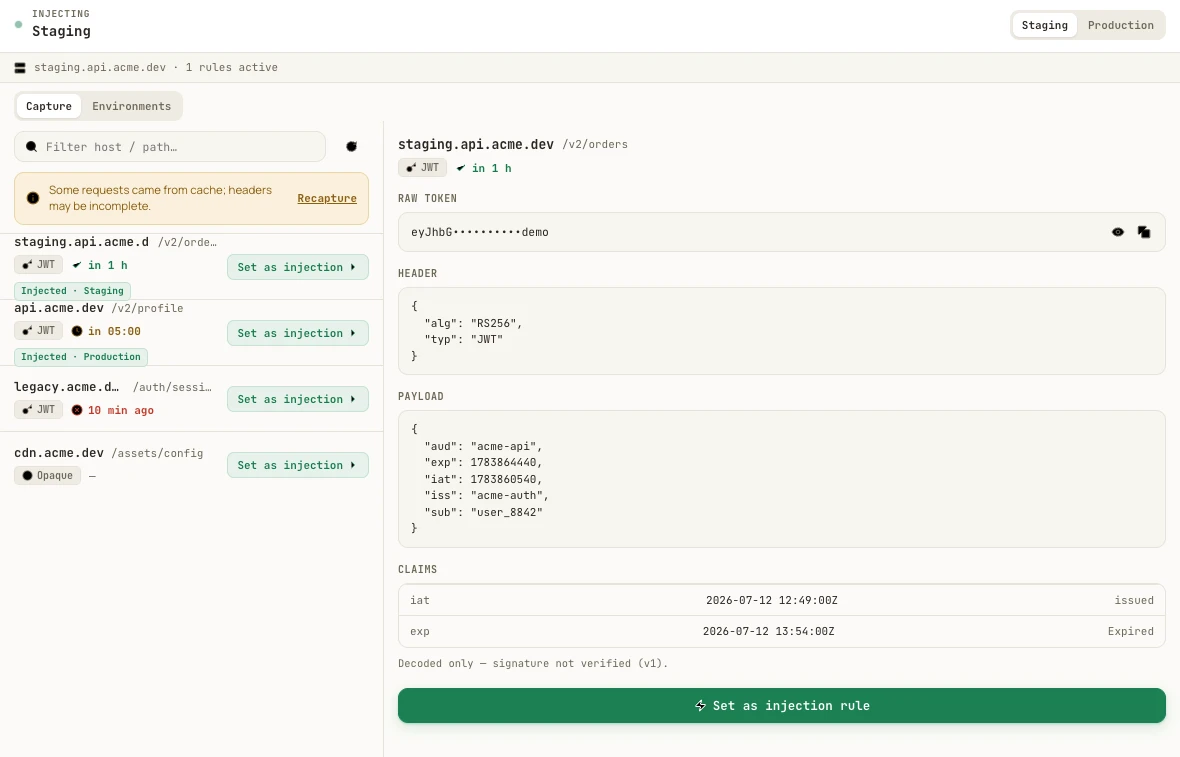
iat and exp into dates you can read.Capture the token from a real request
Install AuthRoam and open its panel in DevTools on the tab that talks to your API. It captures the credentials the page actually sends — bearer tokens, cookie credentials, JWTs — and lists them as requests happen. You’re decoding the real token from the wire, not one you copied into a form and possibly truncated along the way.
Read the header and payload
Select a captured token and it’s decoded on the spot. The header shows the algorithm and type — say RS256 and JWT — and the payload shows the claims as plain JSON: iss, sub, aud, iat, exp. Decoding happens in your browser; the token is never sent to a decoding service.
Check expiry as a date, not a timestamp
exp and iat are Unix timestamps, and nobody reads 1783864440 fluently. The claims table renders both as dates and flags a token that has already lapsed as expired. The capture list carries the same information as a badge on every token — “in 1 h”, or how long ago it died — so a stale token is visible before you spend twenty minutes debugging a 401 that was never a code bug.
Decoding is not verifying
One thing to be clear-eyed about: AuthRoam decodes the token, it does not verify the signature — and the panel says so, right under the claims. A decoded payload tells you what the token claims, not that those claims are genuine or untampered. Verification needs the issuer’s key and belongs on your server. For debugging — which scope is missing, when does this session die — decoding is exactly what you need; for a trust decision it isn’t, and no client-side decoder should pretend otherwise.
Opaque tokens stay opaque
Not every bearer token is a JWT. An opaque session token has no payload to decode, and AuthRoam labels it Opaque instead of inventing structure that isn’t there.
Everything stays local
The whole flow is 100% local with zero telemetry: tokens are captured, decoded and stored only in your browser, and even the Pro license is validated locally rather than phoned home.