How-to · Developer
How to inject an Authorization header per environment in Chrome
The short answer
A header editor like ModHeader can attach one static Authorization header; the per-environment version is to capture each environment’s token from a real request, save it as dev/staging/prod, and switch which one is injected — with expiry visible and everything stored locally.
- 1
Open the AuthRoam panel in DevTools on a tab that calls your API.
- 2
Capture the token from a real request — bearer header, cookie or JWT.
- 3
Save it as an environment: dev, staging or prod.
- 4
Repeat once per environment, then switch the active one to change which token is injected.
- 5
Scope injection to authorized domains in settings, and let the expiry badges warn you before a token dies.
Searches for this problem usually end at a general header-editor extension such as ModHeader: paste a token into a rule and Chrome attaches it to matching requests. Full disclosure before we go further — AuthRoam, the extension in this guide, is ours. The comparison is still honest: a header editor is the right tool for static custom headers, and the wrong shape for juggling live auth tokens across dev, staging and production.
Where a static header rule falls short
A header editor treats your token as a string. It doesn’t know it’s a JWT, doesn’t know when it expires, and doesn’t notice that the staging token is now being sent to production because you forgot to flip a rule. Every environment switch is another copy-paste, and every 401 starts with the same question: is my token stale, or is it my code?
Capture the token instead of pasting it
AuthRoam starts from the requests your app actually makes. Its DevTools panel captures bearer headers, cookie credentials and JWTs as they’re sent, and decodes JWTs locally so you can see claims and expiry. (One honest caveat from the panel itself: decoded only — the signature is not verified.)
Save each environment once
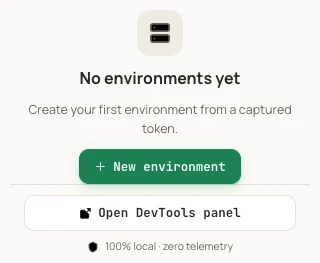
From a captured token you create an environment — dev, staging, prod — each holding its own credential. That’s a one-time step per environment, not a ritual repeated every morning.
Switch what gets injected
Pick the active environment and its token is injected into matching requests — moving from staging to production is a switch, not a re-login and a re-paste. Injection is scoped to the domains you authorize in settings, so a staging token can’t wander onto hosts you never listed, and the panel shows which environment is injecting right now.
Expiry is visible before it bites
Because tokens are decoded, every one carries an expiry badge — “in 1 h”, or flagged as expired. The failure mode of the paste-a-header workflow, quietly sending a dead token for half an hour, becomes something you can see.
What’s free and what’s Pro
The free tier captures and decodes tokens and gives you one environment with manual injection. Unlimited environments, auto-inject rules and token history are Pro. Your Extensionsly account is used only for checkout and copying the signed license; AuthRoam verifies that license locally. Everything — capture, storage, injection and license verification — stays local with zero telemetry.