How-to · Performance
How to suspend inactive Chrome tabs to save memory
The short answer
Let idle tabs go to sleep after a set time — the extension frees up to 90–95% of each tab’s memory and shows a lightweight placeholder. Click the tab to wake it exactly where you left off. Keep pinned, audible, or allowlisted sites always awake.
- 1
Open DozeKeep and set how long a tab may be idle before it sleeps.
- 2
Allowlist sites to keep awake — or rely on pinned/audible tabs staying awake automatically.
- 3
Idle tabs sleep and free up to 90–95% of their memory, showing a placeholder.
- 4
Click a sleeping tab (or Wake all) to restore it exactly where you left off.
Chrome keeps every open tab in memory, even the ones you haven’t touched in hours. On a laptop with dozens of tabs that adds up fast. A tab suspender puts idle tabs to sleep — freeing their memory — and wakes them the moment you come back, without losing your place.
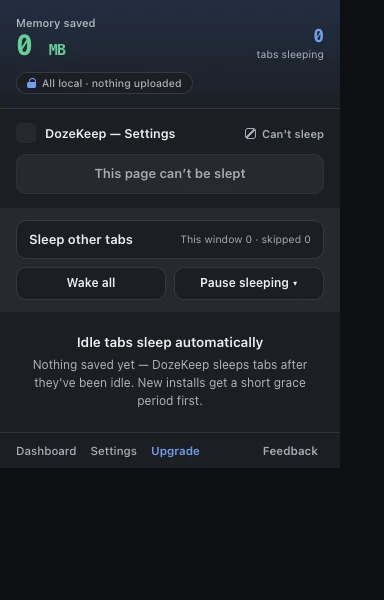
Set an auto-sleep timer
Open the dashboard and choose how long a tab may sit idle before it sleeps (for example 30 minutes). From then on Chrome reclaims the memory of tabs you’ve stopped using — automatically, in the background.
Keep the tabs that matter awake
Pinned tabs, tabs playing audio, and any site you allowlist stay awake. Use Don’t sleep the current site from the popup to protect a dashboard, a doc you’re editing, or a long-running web app by domain.
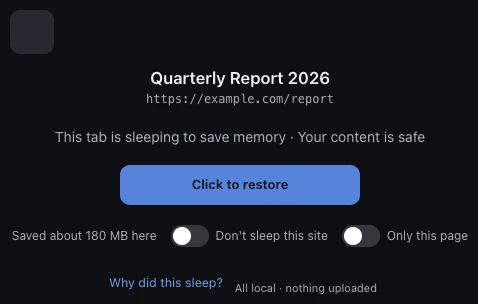
Wake a tab exactly where you left it
A sleeping tab shows a placeholder instead of the live page. Click it and DozeKeep restores the same URL and scroll position — your session is never lost. You can also wake every tab at once from the popup.
It all stays on your machine
Suspension runs locally. DozeKeep is local-first with no all-sites access and no account — nothing about which tabs you open ever leaves the browser.